James Benson's tech hub
  • Blog
  • Contact
  • Blog
  • Contact

Deploying OpenStack Part 2 - Post Deployment

4/24/2018

0 Comments

 
Now that you've deployed OpenStack from my previous post, it's time to configure OpenStack so that we can use it.  This will be a short post showing you the commands necessary to create a functional external network for VM's to reach, along with users, local networking, updating security groups, creating flavors and images.  It sounds like a lot, but it's easy to do with the CLI.

Read More
0 Comments

Deploying OpenStack Kolla Ocata+

4/24/2018

0 Comments

 
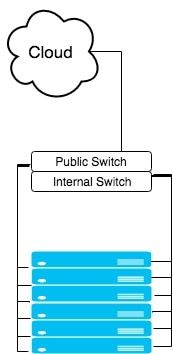
OpenStack Kolla project is an interesting project, however, it can be difficult to setup.  In the docs page of Kolla, there is no description of how to successfully deploy OpenStack using only 1 public interface and 1 private facing interface as shown in the Figure 1.  This type of setup is fairly standard as production clouds typically prefer all internal traffic between VM's/servers to be internal and not reach out to the world.  The internal switch could be multiple switches, perhaps a PXE switch, data at a 10G connection, management switch at 1G, etc. 
​
Inside of their docs, there is an advanced configuration page, which does describe how the interfaces should be separated but assumes you'll be able to figure out the networking.  At first, I assumed that we could just assign an internal IP address for the internal network and external for the external and it would "just work."  This unfortunately does not work.  

The first attempt I did to fix this was to create aliases and in our /etc/network/interfaces file as show below while keeping our eno2 in tact as a static IP.  Unfortunately, Ansible interpretes virtual interfaces (shown in the image below) as eno1_1 and eno1_2 and for the next precheck looks to see if they are active, which only our eno1 and eno2 are, not the eno1_1 or eno1_2.  So this attempt failed as well.


Picture
Figure 1: Simplified Standard Hardware Deployment of Servers
####################
# VIRTUAL INTERFACES
####################
auto eno1

auto eno1:1
iface eno1:1 inet static
    address 192.168.6.31
    netmask 255.255.255.0

auto eno1:2
iface eno1:2 inet static
    name exteno
    address 10.245.126.5
    netmask 255.255.255.0
    gateway 10.245.126.253
    dns-nameservers 10.245.0.10
    mtu 1500
#########################
# END VIRTUAL INTERFACES
#########################
Let's begin....
Node setup:
First on all of your controllers, we will need to install bridge-utils and update the /etc/network/interfaces file.  In the file below my eno1 is internal and my eno2 is public facing.  I converted my eno2 into a bridge​:

Read More
0 Comments

    Author

    James Benson is an IT professional.

    View my profile on LinkedIn

    Archives

    August 2022
    July 2022
    May 2022
    May 2021
    April 2021
    August 2020
    May 2020
    February 2020
    October 2019
    January 2019
    May 2018
    April 2018
    June 2017
    May 2017
    February 2017
    December 2016
    November 2016
    April 2016
    March 2016
    December 2015
    November 2015
    August 2015
    July 2015

    Categories

    All
    Anisble
    Apache Ranger
    Blockchain
    Canonical MaaS
    CentOS 7
    Ceph
    Colloquy
    Configuration
    DevStack
    El Capitan
    FreeIPA
    Git
    Hadoop
    Hyper-V
    IRC
    Kerberos
    Kolla
    LaTeX
    LDAP
    Liberty
    MAAS
    MacTex
    OpenStack
    OpenStack Heat
    Optimization
    R
    RadosGW
    Raspberry Pi 2
    References
    Replication
    RHadoop
    SSH
    Swift
    TexStudio
    Tips
    Ubiquiti
    Ubuntu
    Unifi
    VMware
    Vyper
    Web3.py
    Windows Server
    Windows Server 2012R2
    Windows Server 2016
    ZNC

    RSS Feed

Powered by Create your own unique website with customizable templates.